

Written by Oğuzhan Karahan
Last updated on Sep 8, 2026
●12 min read
FLUX 3 Video Pricing: What Creators Actually Pay Per Clip
FLUX 3 Video pricing looks simple per second, but usable footage depends on duration, quality settings and retakes.
See what drives the real cost per clip and when native audio makes the workflow worth it for your production budget.

Per-second pricing looks simple.
FLUX 3 Video pricing creates confusion because production never pays for raw seconds without duration, quality, and retakes shaping the true final bill.
A longer take, a sharper setting, or one more failed attempt can multiply spend before you hold anything usable for tight edit.
The catch:
You pay for every generation, not just the keeper, so early misjudgments compound into real budget pressure across a full batch of concepts quickly.
Built-in sound adds another tradeoff because fewer production steps must be weighed against higher spend on each attempt and unclear reuse across scenes.
That means the real question is cost per usable clip, often shaped by duration choices, quality settings, retry behavior, and audio value working together.
The resolution is a verification-first math framework that turns billable seconds, settings impact, and keepers into a clear production budget you can trust before scaling with confidence.
FLUX 3 Video Pricing: Turning Per-Second Rates Into Per-Clip Math
FLUX 3 Video pricing translates to per-clip totals through a simple rule: per-second rate times billable seconds, adjusted for HD, FHD or draft settings and higher continuation rates, so identical durations can bill very different totals in real production workflows.
FLUX 3 Video pricing looks flat until settings enter the math.
Initial generation and continuation bill at different per-second rates. Draft, HD and FHD widen the gap further.
The framework stays neutral: per-clip total equals per-second rate multiplied by billable seconds.
That is why FLUX 3 Video pricing rewards draft tests before full resolution commits.
Same 10 seconds can produce very different totals, as shown below.
| Generation type | Verified per-second rate | 10 second per-clip total |
|---|---|---|
| Initial HD | $0.17 | $1.70 |
| Initial FHD | $0.29 | $2.90 |
| Draft HD | $0.06 | $0.60 |
| Continuation HD | $0.43 | $4.30 |
| Continuation FHD | $0.54 | $5.40 |
| Continuation draft | $0.12 | $1.20 |
The catch:
Continuation costs more per second than initial generation.

Chaining adds another generation for each segment, so a base clip plus continuation bills as two separate totals.
Credit to dollar math, plan terms, API billing basis and commercial terms still need official check.
Third-party summaries conflict, so use only official rates for forecasts.

How Duration and Resolution Change FLUX 3 Video Cost
FLUX 3 Video cost rises with longer billable seconds and higher resolution bands, with FHD billing above HD and draft billing lowest, while continuation segments carry a premium rate, so chaining and quality choices directly set the final per-clip total.
Total grows with seconds and setting choice.
Draft stays lowest, HD sits in middle, FHD bills highest.
The comparison below uses verified rates to show duration bands side by side.
Shorter tests limit exposure before longer commits.
| Setting | Verified per-second rate | 5 second total | 10 second total |
|---|---|---|---|
| Initial HD | $0.17 | $0.85 | $1.70 |
| Initial FHD | $0.29 | $1.45 | $2.90 |
| Draft HD | $0.06 | $0.30 | $0.60 |
| Continuation HD | $0.43 | $2.15 | $4.30 |
Use the table to match length to need. That keeps FLUX 3 Video cost tied to decisions you control.

Clip length bands and chaining past 20 seconds
Initial modes cover 5 to 20 seconds per generation. Continuation covers 5 to 15 seconds per added segment.
Past 20 seconds you chain segments.
Each chained segment bills at the higher continuation rate.
HD versus FHD versus draft tradeoffs
HD caps at 1 megapixel per frame, while FHD caps at 2 megapixels per frame.
Draft renders at HD only with the lowest verified rate.
Full HD output can come via upscaling where documented. Verify quality need before paying for FHD on every attempt.
Frame rate and aspect ratio implications
Every mode outputs 24 fps at HD or FHD, with drafts at HD. Supported ratios include 21:9, 2:1, 16:9, 4:3, 1:1, 3:4 and 9:16.
No verified rate change ties to frame rate or ratio alone. Treat them as cost neutral until official docs state otherwise.

FLUX 3 Video Credits: Budgeting Without Guessing Burn Rate
FLUX 3 Video credits burn by billable seconds times the rate for the selected setting, plus a buffer for higher cost continuations and retakes, so budgeting needs variables and yield math rather than a fixed per-clip price for accurate batch forecasts.
Start with seconds, not clips.
FLUX 3 Video credits reflect burn from generation choices. That makes fixed per-clip math misleading for mixed batches.
The better move:
Build the forecast from variables you control, then add a buffer for rejects and continuations.
Estimate billable seconds per attempt, including continuation segments.
Apply the setting rate for draft, HD, or FHD for each segment.
Add a retry buffer based on expected extra generations.
Divide batch spend by expected usable clips.
Multiply by total batches for a budget forecast.

This order matters because credit burn compounds. Longer seconds raise the base, settings change the rate, and retries multiply both.
Use this credit burn framework to compare draft tests against full quality commits before scaling.
No verified bundle, plan, quota, or rate limit data was available in the dossier. Treat any 1 credit equals 0.01 dollar claim as unverified until checked in official docs.

Retry Math: Why Usable Rate Sets True Cost Per Usable Clip
True FLUX 3 Video cost per usable clip equals single generation cost times total generations divided by usable clips, so yield controls spend more than sticker rate and a clear acceptance rule decides when extra retakes stop making sense.
Define usable before you generate.
A usable clip meets your minimum bar for subject, motion, and sync for the edit. Anything below that bar is not a keeper, even if the preview looks close.
The practical result:
Low usable rate raises retry multiplier fast. Two generations per keeper doubles true cost, even when per-clip totals look small.
View the table below as framework math only, not observed reliability.
| Illustrative yield | Generations per usable clip | Cost multiplier |
|---|---|---|
| 10 of 10 usable | 1.0 | 1.0x single clip cost |
| 5 of 10 usable | 2.0 | 2.0x single clip cost |
| 3 of 10 usable | 3.3 | 3.3x single clip cost |

Use usable rate to set a stop rule for FLUX 3 Video cost control.
If two tight fixes do not clear the bar, change the prompt or shorten the shot. Common drivers include motion drift, identity shifts, and sync misses.
That discipline keeps spend tied to decisions. It also protects batch forecasts from open ended retakes.
FLUX 3 Video Native Audio: When Built-In Sound Saves a Second Budget
FLUX 3 Video native audio lowers total workflow cost when dialogue, effects and ambience arrive synchronized in one pass, because it removes separate voice generation, sound layering and repair steps even if the single generation bills at a higher per-clip rate.
Single pass sound changes the budget question.
You compare one higher generation against a longer sound workflow.
The table shows where time and sync risk move.
| Workflow factor | Single-pass native audio | Separate generation plus repair |
|---|---|---|
| Steps | Video plus synchronized audio in same pass | Silent render then voice, effects and sync repair |
| Cost drivers | One billable generation per attempt | Multiple tool runs plus editing time |
| Time and sync risk | Less layering with dialogue matched to picture | Higher manual alignment and retake risk |
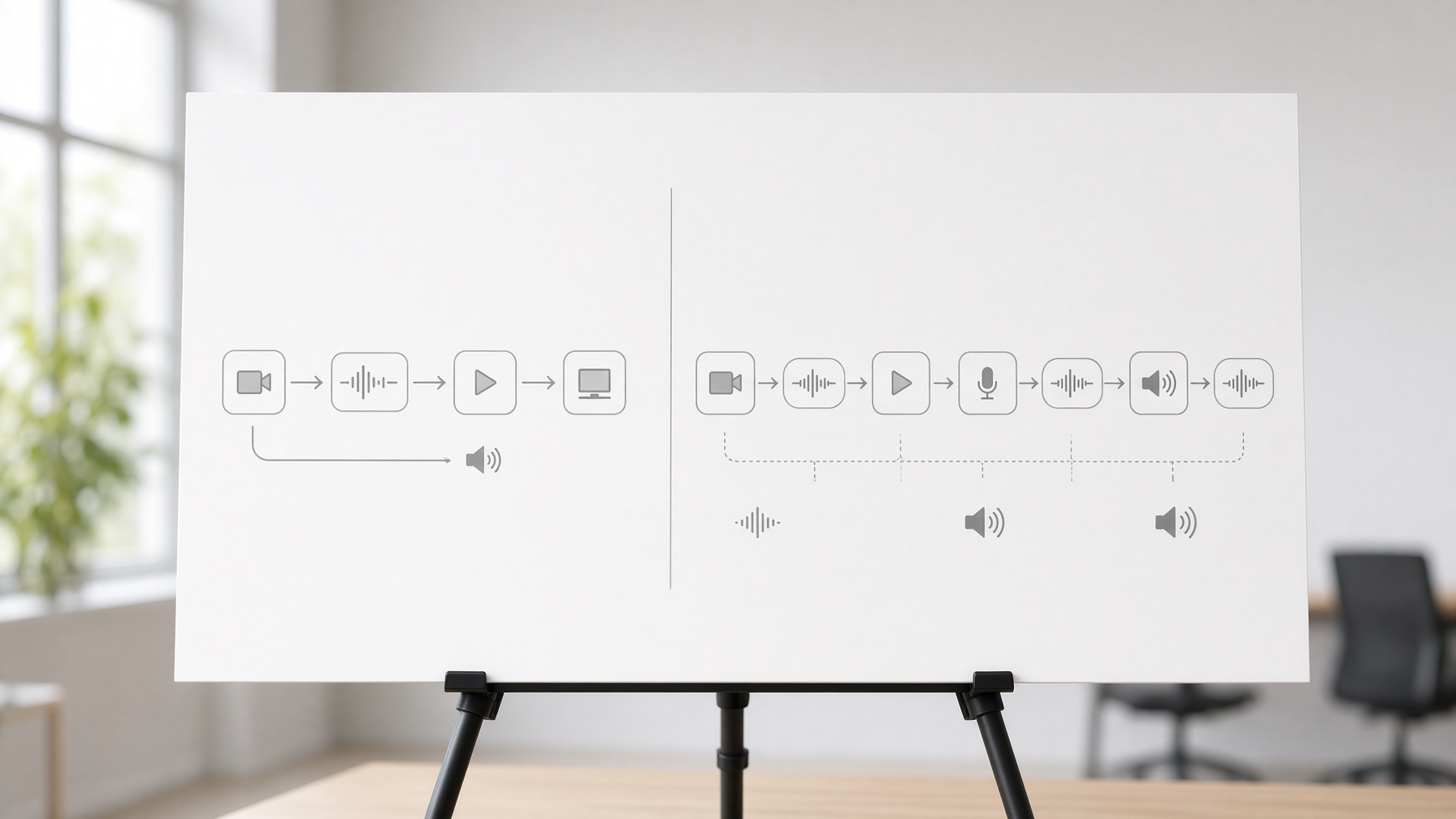
For dialogue led shots, fewer audio driven retakes can offset the higher clip price.
Dialogue heavy clips where sync matters most
Dialogue sync needs matching speech in the same take.
FLUX 3 Video native audio supports multilingual dialogue and synchronized speech in one pass.
Confirm language support in official docs before budgeting.
Effects and ambience in same pass
Footsteps, impacts and room tone land with the action.
That reduces layering because sound follows physical events.
When separate audio still wins
Separate audio keeps control for music and precise voice needs.
Use dedicated tools when casting, mix control or repair quality matters more.

FLUX 3 Video API: What High-Volume Teams Must Verify Before Scaling
High-volume teams should verify FLUX 3 Video API billing unit, setting based rates, quotas, concurrency and commercial terms before forecasting spend, because official rates and limits remain unverified and third-party wrapper figures do not represent official pricing.
Official access context is narrow and scaling details need checks.
Initial generation is generally available through the official API and select partners.
Private weights and partner serverless endpoints add options for high-volume workflow teams.
Use this checklist before forecasting on an API billing basis.
Billing unit: per second versus per generation for each call.
Setting based rates for draft, HD, FHD and continuation segments.
Quota and concurrency limits for batch and peak throughput.
Commercial and licensing terms for client work and redistribution.
Privacy and retention rules for inputs, outputs and data storage.
Fallback path if a feature, rate or limit is unsupported.

Treat wrapper figures as unofficial and verify against official docs.
No verified per-second rate, quota, concurrency or moderation grant was available.
Official terms prohibit commercial exploitation except as expressly permitted.
That verification step protects budget forecasts from wrapper rate confusion.

Controlling Spend Under Real Limits: A FLUX 3 Video Review for Production Budgets
Identity drift, motion incoherence and sync misses most often force retakes, while draft first passes, image anchors and tight duration discipline lower spend because they catch failures early and reduce paid seconds for production budgets.
Most paid retakes trace to visible behavior, not billing math.
This FLUX 3 Video review focuses on those production limits and budget control levers.
Consistency and motion coherence limits
Identity drift breaks usable clips quickly.
A face, outfit or prop shifts during movement and the shot loses continuity.
Source reported early observations mention object inconsistency and physics drift in complex action.
Shorter tests with fewer moving parts tend to hold together better.
Sync and duration control limits
Sync and timing create a second failure point.
A limited three run observation reportedly returned 5.04 second clips with audio but inconsistent duration control.
The same early notes mention typography spacing issues and object inconsistency.
Treat these as limited signals, not general reliability rates.
Practical levers that lower spend
Lock the shot cheaply before paying for quality.
Use draft mode to test motion and framing, then move to HD or FHD only for keepers.
Use image or keyframe anchors to hold identity, skip pure text prompts for hero subjects.
Keep durations tight and chain only after the base clip passes, avoid long first attempts.
Set a two fix cutoff, then change prompt or staging instead of retrying blindly.

Short clips with stable anchors waste fewer paid seconds.
For production budgets, this FLUX 3 Video review favors draft first discipline and strict cutoffs.
FLUX 3 Video pricing rewards that control because fewer retakes means lower true cost per keeper.
Frequently Asked Questions About FLUX 3 Video Cost and Value
How do you calculate FLUX 3 Video cost per usable clip?
Multiply billable seconds by the setting based rate, then adjust for total generations divided by usable clips. Verify the current rate in official docs first, since third party figures differ and retries raise the true total fast.
How do FLUX 3 Video credits work for budgeting?
Think of FLUX 3 Video credits as seconds based burn shaped by duration, quality band and retakes, not a fixed price per clip. Verify credit value, bundle rules and expiry in your account before forecasting a batch.
Does FLUX 3 Video native audio cost extra?
Official model notes list optional native audio as included at no extra charge, so confirm that inclusion for your access path before you budget. It often saves money when dialogue or synced effects would otherwise need separate voice generation and repair work.
When should high-volume teams consider FLUX 3 Video API use?
Consider FLUX 3 Video API use when you need repeatable volume with clearer queue control and project level billing. Verify billing unit, quotas, concurrency and commercial terms in writing first, and check current terms before client work because wrapper pricing is not official pricing.
How many retries should you budget before changing tactics?
Budget a small retry buffer for each keeper, then pause full quality runs when drafts keep failing the same identity or sync check. Tighten the prompt, add an image anchor or shorten the shot before you pay for higher bands again.
What does this FLUX 3 Video review mean for tight production budgets?
FLUX 3 Video pricing fits best for short planned shots where built in sync removes extra audio steps. Test complex motion in draft first and skip longer hero shots until the anchor holds identity cleanly.


