
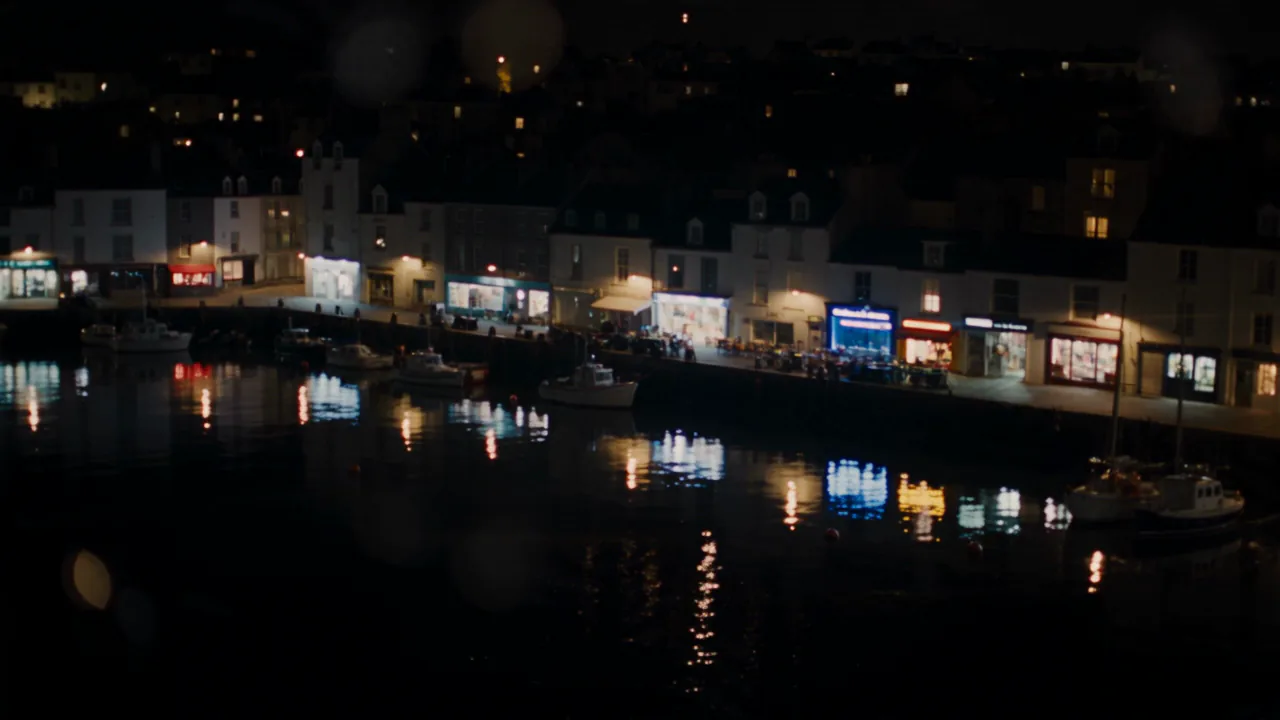


[shot: extreme wide] [camera: crane up] film stock Kodak 500T …
Six departments. One tap each. Every video model.
Stop guessing camera words. Director Mode puts a film set next to every prompt box: call the film look, shot, camera, lens, lighting and sound with a tap, and every video model on Creatide AI shoots it.
Your prompt stays yours. The engine handles the jargon.
Call the shot
← tap the clapper next to any prompt box
Launched
Definition
Director Mode is AI camera control without the jargon. You write what happens; you tap how it’s shot. Creatide AI turns your calls into the exact instructions each video model understands.
Every AI video generator hands you an empty text box and hopes you know the words. “Anamorphic.” “Bleach bypass.” “Dolly in.” If you know them, you still have to remember to type them, in the right order, for the right model.
Director Mode moves those decisions out of the prompt and onto a set. Six departments, tap to call. Your prompt is left alone to do what it does best: tell the story.
How does one tap speak every model’s language? That’s a little Creatide AI magic, and it stays our secret. It keeps getting better on its own, so the same tap gives you a better take over time without you changing a thing.
The empty box problem
Most bad AI videos aren’t bad ideas. They’re good ideas shot by default: medium shot, flat light, floating camera. Here’s the same idea twice.
Ext. coastal town — night
Fireworks over a coastal town at night, cinematic, 4k, epic, film grain, wide angle, slow motion, dramatic lighting, masterpiece
Keyword soup. Half of it is ignored, the rest fights itself.
REJECTEDExt. coastal town — night
Fireworks burst silently over a sleeping coastal town.
A clean story line, plus six deliberate calls. Nothing contradicts.
APPROVEDThe departments
A real set runs on a call sheet. Director Mode gives you one: six departments, one call each. Pick a row to see the options.
How the camera moves. Movement is what makes AI video feel shot instead of animated.

Shaky, wide, close to the ground, neon smearing across wet tarpaulin. The same courier, now running from something.

Gliding behind the courier through stalls packing up, sun low between awnings. A memory more than a race.
Video village
Video models don’t speak the same dialect. One wants camera moves in brackets, another reads plain sentences, a third listens to lens names. Director Mode translates your calls for each one.
You write: “Fireworks burst silently over a sleeping coastal town.” · You call: Kodak 500T · Extreme wide · Crane up · Anamorphic · Neon night · Silence
[shot: extreme wide] [camera: crane up] film stock Kodak 500T …

An extreme wide shot on an anamorphic lens, the camera craning up … no audio.

camera movement: crane up; framing: extreme wide; lighting: neon night …
Model-specific wording above is illustrative. The point: you call the shot once, and Creatide AI phrases it the way each model listens. Switch models and your calls come with you.
Shot list
Six calls that work together. Tap Surprise me for random combos, or start from one of these.

Quiet faces, honest light. Festival-short energy.

Sharp highlights, creamy background, a slow push onto the hero.

Big flares, wet streets, a rising reveal on the chorus.

Raw and close. Feels found, not made.

Big places, warm sun, a camera that walks with you.

A face, a slow push, no sound. Something is about to happen.
End credits
Every card in Director Mode uses the real name. Here’s what the less obvious ones mean, so you know what you’re calling.
that’s a wrap.
Where to find it
Director Mode isn’t a separate app. It sits next to every video prompt bar on Creatide AI.

The mini clapper lives at the right edge of every video prompt box.

Tap a card to cycle options. Leave any department uncalled to let the model decide.

Your prompt and your calls go to the model together. Re-roll keeps the calls.
Who it’s for
Give every video a signature look and keep it across a whole series.
Call the same look, lens and light for every variation in a campaign.
Show a scene the way you’d actually shoot it, before the shoot.
Match camera and light to each verse without writing a shot list.
Stack it
Your calls aren’t a separate world. They travel with the rest of the Creatide AI engine, so one decision shapes the whole take.
Compare
You could type every camera word yourself. Here’s what changes when you don’t.
| Director Mode | Typing it all in the prompt | Prompt-helper add-ons | |
|---|---|---|---|
| What you write | The story only | Story plus every technical term | Story, then a pasted block |
| Model dialects | Translated for each model | You learn each one | Usually one generic format |
| Conflicting terms | One call per department | Easy to stack contradictions | Common |
| Switching models | Calls carry over | Rewrite the prompt | Paste again |
| Price | Free on Creatide AI | Free, costs time | Often a separate subscription |
Storyboard
Director Mode does the vocabulary. These habits do the rest.
You don’t have to call all six. Calling three strong departments often beats six weak ones.
Handheld feels urgent, dolly feels inevitable, crane feels final.
If a take feels wrong, change the lighting call before rewriting the prompt.
Who does what, where. Leave the how to your calls.
Lock the look across takes, then change one department at a time.
FAQ
A control panel next to every video prompt box. You call the film look, shot, camera, lens, lighting and sound with taps, and Creatide AI turns those calls into instructions each video model understands.
No. Your prompt stays exactly as you wrote it. Your calls ride alongside it, and a little Creatide AI magic does the rest.
Every video model on Creatide AI, including Seedance, Gemini Omni Flash, Kling, Wan, MiniMax, Grok Imagine, Pika and Pixverse.
No. Director Mode is free to use. You pay only for the video you generate, as usual.
No. Every option is a plain card you can tap and cycle. The terms are there if you know them, and you learn them as you go.
Yes. An uncalled department lets the model decide. Reset clears every call.
It calls a random option in every department. Great for finding a look you wouldn’t have picked.
Yes. Your start frame sets the subject and composition; your calls steer camera movement, lens feel, light and sound.
Yes. Photo Studio Mode does the same for images and Composer Mode for music, from the same clapper button.
A template pastes the same words into every prompt. Director Mode keeps your prompt clean, sends calls separately and rewrites them for each model, so switching models doesn’t break your look.
Yes. Your calls hold for the whole length of a 2× duration take, and the finished video can be exported up to 8K.
Yes. Save your favourite calls as a preset and bring them back in one tap, or mix a preset with custom calls for a single shot. Your calls also stay set while you work, across re-rolls and model switches, so a whole series can share one look. Reset clears them when you want a fresh start.
You can, by leaving departments uncalled. But models default to the most average choice: a medium shot, soft light and a gentle float. Calling even two departments is usually what makes a clip look intentional instead of generated.
Write the story. Call the shot. Hit Action.
Free on every video model · Works with 2× duration and 8K