


Every second costs compute
A video model renders every frame at once. Doubling the length can more than double the work, so makers cap it.
15 s becomes 30 s. 30 s becomes 60 s. On every video model.
Every video model on Creatide AI now runs twice as long as its maker allows. One prompt, one take, double the story. We call it 2× duration.
One prompt. One continuous take. Twice the length.
Launched · Beta
Definition
2× duration lets any AI video model run twice as long as its maker allows. You write one prompt and get back a single, continuous take, up to twice as long as the model normally allows.
Every video model has a ceiling. Some stop at 5 seconds, some at 10, the best at 15 or 30. That’s enough for a moment. It’s rarely enough for a story.
Until now, making longer AI videos meant stitching clips by hand and hiding the cuts. With 2× duration, you move the length slider past the limit and Creatide AI does the rest. Same model, same prompt, twice the take.
The cut problem
It isn’t a creative choice. It’s a hardware and memory choice the model maker made for everyone.
A video model renders every frame at once. Doubling the length can more than double the work, so makers cap it.
Push a model past its training length and faces, outfits and light start to wander. A hard limit keeps quality up.
Most people make short clips, so the default is short. If you make ads, reels or scenes, that default gets in the way.

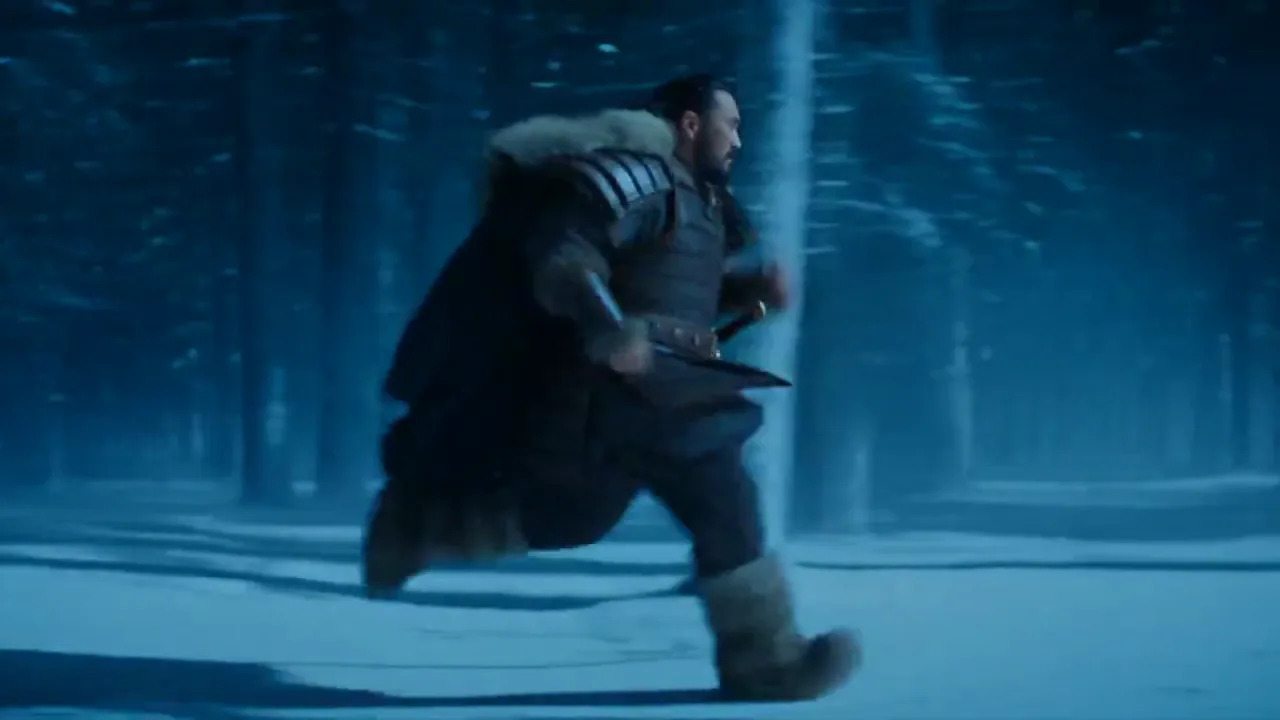
A lone Göktürk warrior flees wolves through a snowstorm and reaches a cliff at sunrise. Made from one prompt, on a 30-second model, with 2× duration.
How to use it
No new tool, no new workflow. 2× duration lives in the same prompt bar you already use, on every video model.
Every model in the Creatide AI video generator supports 2× duration, from fast draft models to flagships.
Move the length slider beyond the model’s own maximum. The new ceiling is twice the old one.
Write one prompt, hit generate and download one continuous video. Failed runs refund their credits.
2× on every model
The math is the same on every model. Take the model’s own maximum, multiply by two. That’s your new ceiling.
Long AI video, explained
Six things people ask before they make their first long AI video. Read top to bottom, like a take that keeps rolling.
Most AI video generators make clips of 5 to 10 seconds. Past 15 seconds, a clip starts to feel like a shot; at 30 to 60 seconds it becomes a scene. That is long AI video territory, and 2× duration takes every model on Creatide AI into it.
Draft and fast models usually stop at 5 to 8 seconds. Mainstream models sit around 10. Flagship models reach 15 or 30. With 2× duration those ceilings become 10 to 16, 20, and 30 to 60 seconds, from the same prompt.
Pick any video model, drag the length slider past its limit and write one prompt with a beginning and an end. Creatide AI hands you back one long AI video. No editing app, no second prompt, no stitching.
On any model with a 30-second limit, 2× duration gives you a full 60-second AI video in one generation. That is long enough for a vertical reel, an ad with an end card, a music video verse or a short story scene.
Short clips are great for loops and hooks. Long-form AI video lets an idea develop: a setup, a turn and a payoff. It also saves editing time, because there are fewer clips to stitch and no jump cuts to hide.
Already have a take you like? Video extend keeps it going, one new prompt at a time. Use 2× duration for the first long take, then extend it for even longer AI videos.
Continuity
A long AI video is only useful if it looks like one shot. 2× duration keeps everything that makes a shot feel continuous.
The cast
2× duration isn’t locked to one model. It’s part of the Creatide AI engine, so it works on the whole line-up. New models get it as they join.
Line-up as of November 2026.
Use cases
Some ideas only work if the shot keeps going. These are the ones creators asked for first.
A broadcast-length 30-second spot: hook, product, payoff, end card. One generation, no edit.
A full 60-second reel from one prompt. Enough time for a setup, a turn and a reason to watch again.
Cover a whole verse or chorus with one continuous shot instead of cutting every eight seconds.
A scene with a beginning and an end. The character enters, something happens, the shot resolves.
Orbit the product, open it, show the detail. Every step in one move, with no jump cuts.
Long enough to show a process from first step to result, so the viewer follows it.
Showcase
Every clip below runs past its model’s limit. Each one is a single, continuous take from a single prompt.

“A lone rider crosses a salt flat, from first light to full sun.”

“A skater drops in, carves the bowl and lands the trick.”

“A courier runs a neon alley in the rain and rounds the corner.”

“She reads the letter, looks up, and starts to laugh.”

“A paper boat travels the whole length of a rainy street.”
Compare
Three ways to get past the limit. They solve different problems, and they stack: make a 60-second take, then extend it.
| 2× duration | Video extend | Stitching by hand | |
|---|---|---|---|
| Prompts you write | 1 | 1 per extension | 1 per clip |
| Max length per run | 2× the model limit | Model limit, chained | Model limit |
| Continuity | One continuous take | Grows a clip you already have | Visible cuts you hide by hand |
| Story planning | One prompt covers it | You plan each next beat | You plan everything |
| Best for | One continuous shot, up to 60 s | Growing a take you already like | Multi-shot edits |
Prompt guide
A short clip needs one action. A long take needs a little story. Give it a beginning and an end, and the take has room to tell it.
A cyclist rides out of a sleeping city at blue hour. Wet streets, one red traffic light. Low tracking shot, steady speed.
The road climbs into hills as the sun breaks the horizon. Same tracking shot, rising slowly. Birdsong replaces the traffic.
60 S. ONE TAKE.
Pricing
You pay per second of output, the same as any other take. A 30-second video costs what 30 seconds costs on that model. There’s no extra fee for going 2×. You only pay for the seconds you make.
And seconds on Creatide AI cost over 5× less than Higgsfield. 30 seconds of Seedance 2.5 at 1080p is $4.34 here, against $23.52 on Higgsfield. Same model, a fifth of the price.
Creatide AI price on Omni Creator 3x (yearly). Higgsfield standard list price on Plus (monthly), 1,000 credits for $49; promotions and annual discounts excluded. Checked November 2026.
Compare plansBeta
It means it’s live on every model today and we’re still polishing the hardest shots. Here’s what to expect, honestly.
Steady camera moves, slow action and a single subject give the smoothest results.
Whip pans and sudden jumps are the toughest shots for any model. If a take isn’t right, re-roll it or simplify the camera move.
If a generation fails, the credits go back to your wallet automatically.
Stack it
2× duration works with the rest of the Creatide AI engine. Turn on everything for one take.
Twice the native length on every video model.
Export the whole take in 2K, 4K, 6K or 8K. See 8K output
Call the film look, lens and light once. The whole take follows your calls.
FAQ
Up to twice the model’s own limit in a single generation. A 15-second model gives you 30 seconds and a 30-second model gives you 60. With video extend you can keep going after that.
Yes. It’s part of the Creatide AI engine, not a feature of one model, so it works on Seedance, Gemini Omni Flash, Kling, Wan, MiniMax, Grok Imagine, Pika and Pixverse. New models get it as they join.
That’s Creatide AI magic, and it stays our secret. You write one prompt, set the length past the model’s limit and get back one continuous take. There’s nothing extra to learn or install.
Yes, that’s the point. The character, light, camera move and sound stay consistent from the first second to the last. Very fast action is the hardest case for any model; if a take isn’t right, re-roll it.
You pay per second, like any take. A 30-second video costs what 30 seconds costs on that model. Failed generations refund their credits automatically.
No. 2× duration makes one long take from one prompt. Video extend continues a clip you already have, one new prompt at a time. You can use both on the same video.
Yes, on any model with a 30-second limit. Set the length to 60 seconds and generate. Shorter models top out at twice their own limit.
Yes. Your image opens the shot, and the take runs for up to twice the model’s limit. It works the same way with reference to video and lip sync.
On models with native audio, yes. Music, dialogue and ambience run from start to finish without jumping.
It’s live on every model, and we’re still polishing the hardest shots. Beta doesn’t limit what you can make or change the price.
Pick any model. Drag the length past its limit. Watch the take keep going.
2× duration on every model · Beta · Credits back on failed runs


