
Written by Oğuzhan Karahan
Last updated on Aug 28, 2026
●8 min read
First/Last Frame Animation: A Deterministic AI Animation Workflow for Kling, Veo, and Wan
How professional editors use start and end pose constraints to force deterministic motion in AI video.

Text-to-video prompts hallucinate.
They drift across frames, swap faces mid-shot, and break the moment a commercial-grade pipeline needs the same character to walk through a 10-second scene without changing identity.
The fix is deterministic motion.
Define a start pose and an end pose, then let the model fill the temporal space between them instead of improvising from a text description alone.
That single shift turns an AI animation workflow from a guessing game into a directed sequence.
This guide covers the first/last frame anchor technique across Kling 3.0, Veo 3.1, and Wan 2.7, with the technical anchors that make it work:
Spatiotemporal attention, Flow-Guided Latent Propagation, and 3D Gaussian Splatting constraints.
You will get the Character DNA setup for locking identity, a model-by-model breakdown for choosing the right engine per shot.
The actionable troubleshooting that fixes temporal drift, duration mismatches, and lighting parity breaks before they reach a client review.
Why Text-to-Video Fails: The Case for Dual-Keyframe Control
Text-to-video prompts hallucinate character identity and drift because they generate from loose descriptions without fixed endpoints. The dual-keyframe approach in an ai animation workflow supplies start and end poses, letting the model interpolate the motion path between them rather than improvising freely from text.
Text-only prompting leaves the model to invent motion at every step.
This produces identity shifts and broken continuity in longer sequences.
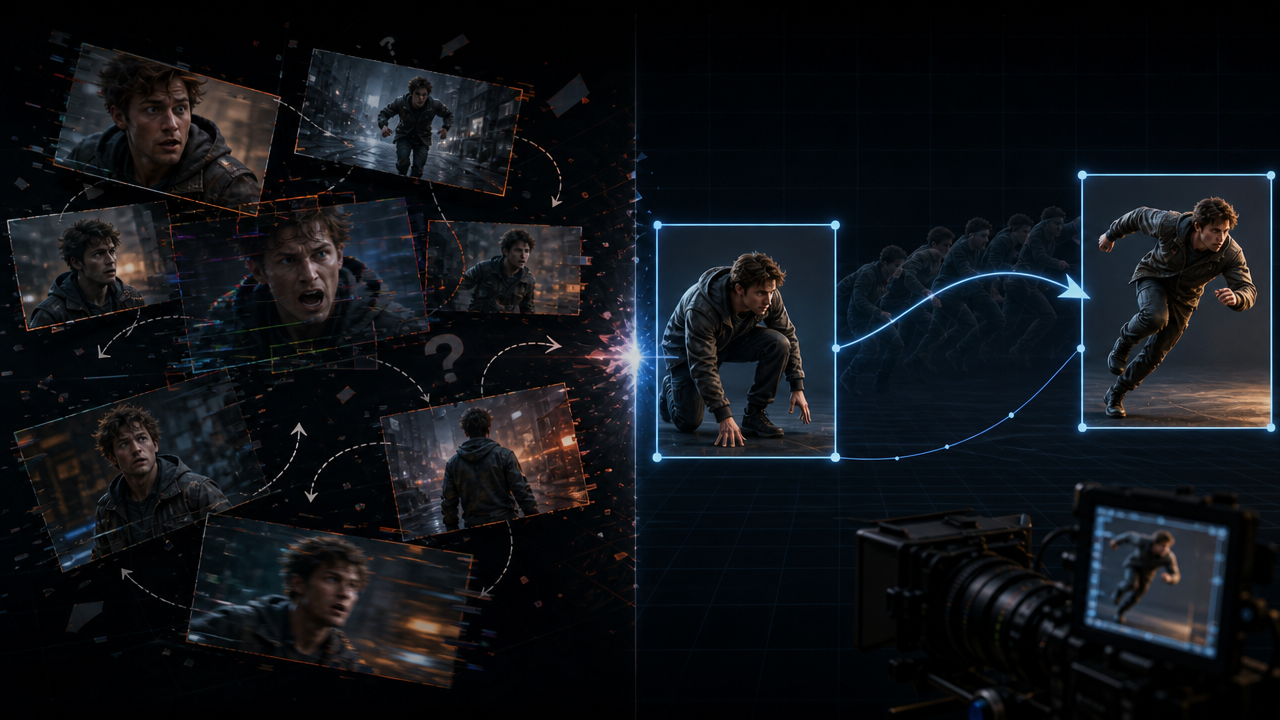
Single-frame image-to-video improves on pure text but still allows drift.
The model extrapolates forward without an endpoint constraint.
Dual-keyframe generation inverts that process.
The model receives both the start pose and the end pose as hard constraints.
It then fills the temporal space between those two states.
This overrides direct text generation by anchoring the entire sequence to defined endpoints.
Watch this Planet Ai tutorial to see Kling interpolate a finished shot from a first frame and an end frame, instead of inventing the motion from text.
The clip starts with a camera pan from a man to a woman, then tries a harder flyover that has to land on a second character.
Pay attention to identity lock and the camera path, especially in the pan, where the two stills keep the move from reading as separate images.
Reported research on ConsistI2V shows that spatiotemporal attention mechanisms support constrained interpolation by focusing on consistent subject features across time.
The workflow shift moves from describing a scene to defining its start and end states.
That change reduces hallucinations because generation becomes an interpolation task rather than open-ended prediction.
Character DNA: Building the Identity Anchor for Start and End Poses
The Character DNA / Identity Anchor setup ensures commercial viability by preparing start and end poses with shared lighting parity, framing continuity, palette consistency, and subject continuity, allowing the model to treat them as hard constraints rather than suggestions.
Design the start pose and end pose to share lighting parity. Both frames require the same illumination direction and intensity.
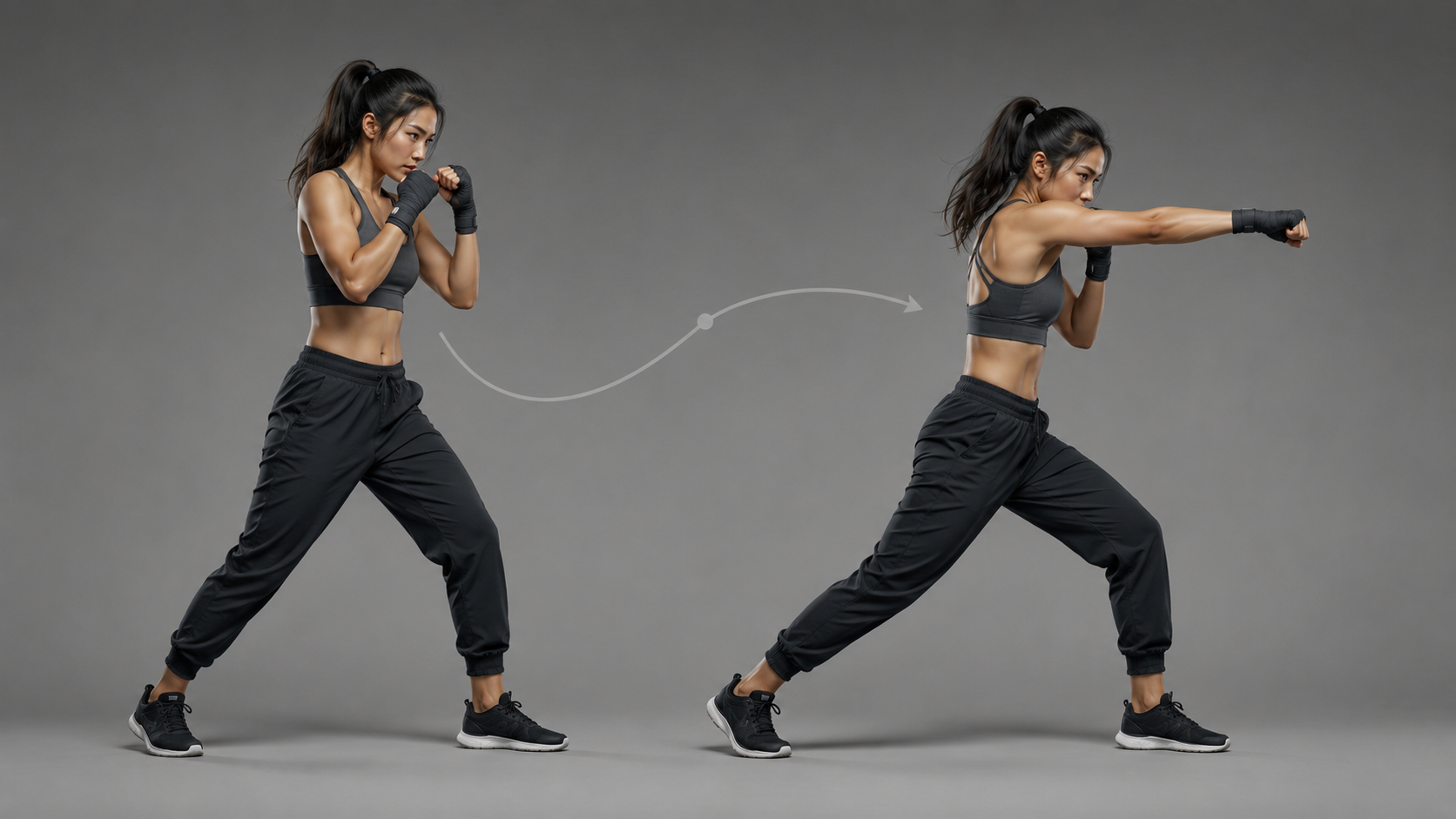
Framing continuity follows next. Keep the subject in matching position and scale between the two anchors.
Apply consistent reference imagery to both poses. This locks character identity through matching visual features.
The AI fills the temporal space between the start pose and end pose of a consistent character. This overrides direct text generation by anchoring the entire sequence to defined states.
Palette matching maintains color consistency in the motion path. The model relies on these shared properties during interpolation.
Subject continuity in pose, clothing, and features prevents shifts. The model treats the frames as hard constraints rather than soft suggestions.
Prepare both frames with identical camera angle and subject orientation. That preparation step makes the generation a constrained interpolation task rather than an open-ended one.
Model Benchmarks: Kling 3.0 vs Veo 3.1 vs Wan 2.7 for Dual-Keyframe Generation
Kling 3.0 provides documented support for dual-keyframe generation with flexible clip lengths and strong character handling. Detailed dual-keyframe benchmarks for Veo 3.1 and Wan 2.7 are not available in the current sources, limiting direct comparisons to general model capabilities.
This approach works when the two frames maintain similar lighting and subject continuity.
The model can operate without additional prompts or accept them for specific details.
Kling 3.0 produces clips between 3 and 15 seconds long at 720p or 1080p resolution.
It recognizes basic camera movements such as push-in, pull-back, pan, and tilt.
The Character DNA setup serves as the prerequisite for these generations.
For Veo 3.1 and Wan 2.7, the lack of specific dual-keyframe data means their performance in this workflow relies on broader reported capabilities.
Professionals should verify current model behavior through direct use for critical projects.
This AI2Play Google Flow tutorial is worth watching here because it shows Veo 3.1 Frames to Video with an uploaded start frame and end frame.
In the shopping test, the end frame is what forces the shot to finish on a close-up after the subject picks up a product.
Watch for person consistency, product continuity, and where the landing frame holds, then judge that interpolation yourself.
That creates a trade-off: Relying on Kling for proven dual-keyframe results while monitoring updates for the other models.
Fixing Temporal Drift: Interpolation Math and Frame-by-Frame Stability
Dual-keyframe outputs drift when lighting parity between anchors breaks or when duration exceeds the model's stable range for the motion. Spatiotemporal attention from ConsistI2V research maintains subject integrity by focusing on consistent features across frames. The fix centers on enforcing lighting parity and selecting durations that match movement complexity.
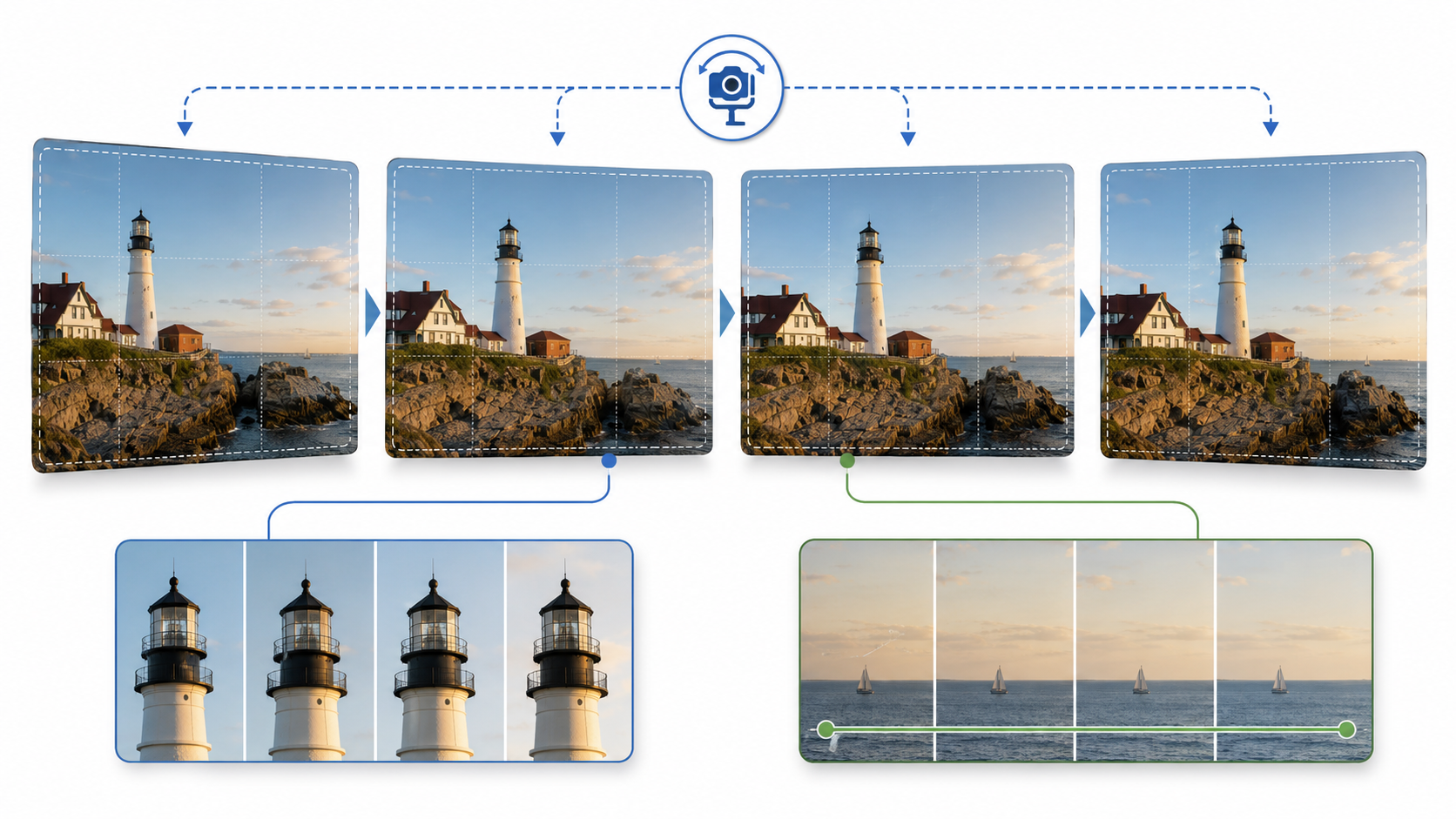
Review the generated sequence frame by frame after the first pass. Identify any shifts in subject position, lighting direction, or color balance between the start and end poses.
Enforce lighting parity on the anchor frames before the next generation.
Match illumination direction and intensity so the model interpolates along a consistent path rather than inventing new light sources.
Adjust duration based on movement complexity. Shorter clips keep interpolation simpler and reduce the chance of visible drift.
Actionable Settings: Duration, Camera, and Prompt Constraints
Duration selection depends on the shot type. Five-second clips work best for dynamic transitions because they limit the interpolation distance and keep subject features stable.
Ten-second clips suit complex movement when the start and end poses share strong continuity.
Longer durations increase the risk of frame-by-frame shifts if the motion path grows too intricate.
Camera move language stays simple and direct.
Terms such as push-in, pull-back, pan, tilt, and handheld sway give the model clear direction without overlapping subject motion instructions.
Separate camera direction from subject motion in the prompt.
This separation prevents the model from blending the two signals and producing unstable paths where the subject warps to follow the camera.
Lock duration first based on the planned action.
Then define the camera move with precise terms.
Finally write the subject motion as a separate clause so each constraint stays independent.
Frequently Asked Questions
How do I build a character identity anchor using start and end poses?
To build a character identity anchor, design your start and end poses to share the same lighting direction, intensity, framing, and subject details. This allows the AI model to treat both frames as fixed constraints rather than creative suggestions.
What role does lighting parity play in dual-keyframe AI video generation?
Lighting parity ensures consistent illumination between the anchor frames. It prevents lighting shifts that cause the model to introduce unwanted variations during interpolation.
Which model supports dual-keyframe generation effectively?
Kling 3.0 is well-documented for dual-keyframe generation, offering flexible clip lengths and strong character handling. Models like Veo 3.1 and Wan 2.7 have less publicly detailed support for this feature.
How can I fix temporal drift during video interpolation?
Temporal drift occurs when motion instructions conflict or when the video duration exceeds the model's stable range. Enforcing lighting parity and selecting durations that match the movement complexity helps maintain subject integrity.
What video durations work best for interpolating between two keyframes?
Optimal durations depend on the complexity of the motion. For subtle movements, shorter clips under 10 seconds work best. Longer clips require careful selection to avoid drift.
How do I maintain character consistency when uploading start and end frames?
To maintain consistency, keep the subject, pose, and framing identical except for the specified motion between frames. Use the same character reference or image prompt across uploads.
Is Kling 3.0 suitable for interpolating motion between poses?
Yes, Kling 3.0 accepts start and end frame uploads to generate interpolated videos. It's particularly effective for character-driven animations when poses are well-defined.


