●19 min read
Kling 3.0 vs Hailuo 2.3: Which Costs Less per Usable Clip?
Kling 3.0 and Hailuo 2.3 both deliver high-quality AI video, yet their real production cost hinges on usable clips rather than headline pricing.
First-pass quality, consistency, and speed determine how many generations you actually need before publishing.
This guide breaks down the two models on cost-per-usable-clip metrics to help you choose the workflow that minimizes waste and maximizes output.

Headline credit prices mislead.
For AI filmmakers and social teams, a cheap-looking model still burns the week when first-pass failures stack.
Kling 3.0 and Hailuo 2.3 both sell smoother motion and cleaner detail.
That promise breaks when unusable takes pile up.
The real cost is not one weak generation.
It is the chain reaction: extra takes, slower approvals, and a clip that still misses the brief.
The catch:
You are not buying generations. You are buying usable clips.
A practical Kling 3.0 vs Hailuo 2.3 comparison starts with cost per accepted output, not the sticker credit rate.
That framing keeps the call honest for agencies, advertisers, and faceless channel teams under real deadlines.
By the end, model choice should feel like a production decision: first-pass quality, consistency that cuts retries, and speed that does not hide waste.
Generic feature lists miss that gap.
They rank strengths while reject rates keep burning credits.
The better move:
Run both against identical character references, action prompts, camera directions, and hard acceptance rules.
Then the cheaper path becomes the workflow that needs fewer re-renders.

Kling 3.0 vs Hailuo 2.3: Cost-per-Usable-Clip Evaluation Framework
Judge Kling 3.0 vs Hailuo 2.3 by cost per accepted clip, not sticker credit price. Track first-pass usability, character consistency, prompt adherence, motion quality, generation speed, and re-render rate under identical character references, action prompts, camera directions, and fixed pass/fail criteria.
A low headline rate still loses money when most takes fail acceptance.
That means: production cost is generations required for one publishable clip, including retries and review time.
Kling’s own credit-planning guidance treats duration, resolution, sound needs, reference setup, retries, and review cycles as budget items, then recommends a short test pass before scale.
Help notes for Hailuo 2.3 also point to residual artefacts and iterative prompt work, so listed generation price alone cannot stand in for usable output.
Use six non-overlapping axes so one weakness does not hide another:
First-pass usability: whether the first take clears the brief without salvage edits
Character consistency: identity stability on recurring faces, wardrobe, and props
Prompt adherence: fidelity to action, composition, and camera language
Motion quality: body physics, micro-expressions, and clean frame transitions
Generation speed: turnaround that supports batch review without queue drag
Re-render economics: extra generations forced by failed acceptance checks
First-pass usability and re-render rate drive the real AI video credit comparison more than any single feature claim.
A clip that looks “almost there” still costs full credits again when identity drifts or the camera move misses the brief.
Lock a shared method before you prefer either model.
Feed both the same character references, the same action prompts, and the same camera directions.
Then score pass/fail on fixed rules:
identity hold, required action complete, camera intent met, and no salvage-only artefacts.
The practical result:
agencies and social teams can route scenes by fewer accepted re-renders, not by marketing feature lists.
Character Consistency: Kling 3.0 vs Hailuo 2.3
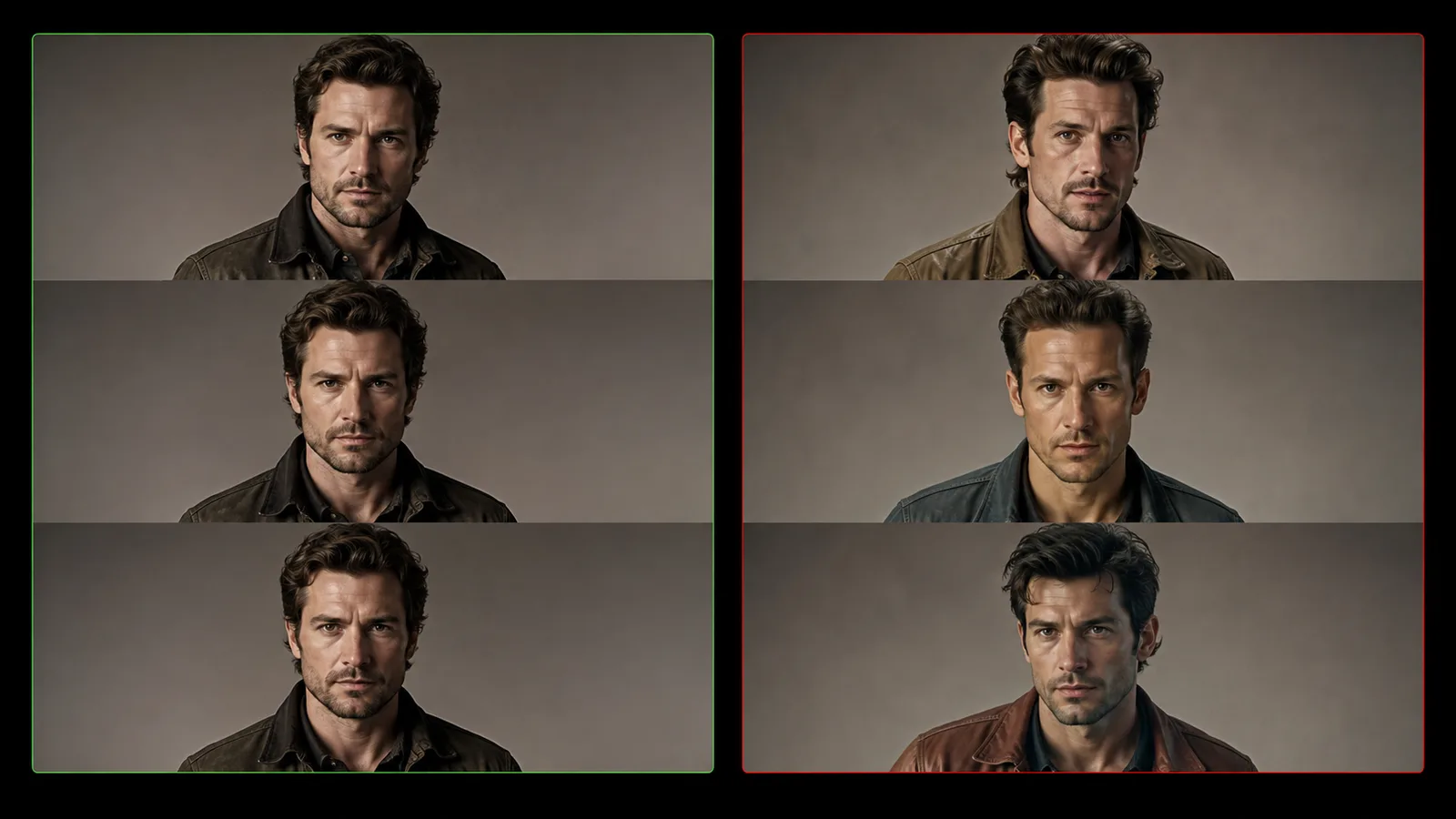
Character consistency is the highest-stakes cost driver in a Kling 3.0 vs Hailuo 2.3 workflow because identity drift forces re-renders before a clip can ship. Compare both with identical character references and fixed pass/fail identity rules rather than trusting feature claims alone.
A face that shifts mid-scene is a production stop, not a style issue.
For series work, AI video character consistency decides whether one take ships or a retry loop starts.
Look:
Identity failure burns credits faster than soft motion or mild prompt drift.
Wardrobe, hair, face shape, and props must clear the same bar on every accepted take.
Kling 3.0 documentation surfaces element-reference and multi-shot workflows for recurring characters and products.
Official Kling credit-planning guidance treats reference setup, retries, and review cycles as budget items, not optional overhead.
A clean element library can anchor identity, but failed locks still cost credits.
Watch this Kling 3.0 tutorial from Jason Gandy to see single-shot generation, multi-shot sequencing, and Bind Elements in the generator itself.
This walkthrough belongs here because character lock is a setup problem, not a slogan.
Pay attention to how recurring subjects are bound across shots.
Then judge whether that control would cut face, wardrobe, or prop retries on your locked reference pack.
Hailuo 2.3 help notes report stronger facial accuracy, micro-expression detail, body movement, and physical realism than earlier Hailuo versions.
Image plus text input can guide subject appearance from the first frame.
Platform notes still flag occasional artefacts, so iterative prompt work remains part of the path.
Neither model publishes a verified identity pass rate.
So compare workflow control, not a leaderboard score.
Run both on the same locked reference pack with fixed action prompts and camera directions.
Score only identity lock, wardrobe continuity, and face stability.
| Check | Fail signal |
|---|---|
| Face identity | Bone structure or age drift |
| Wardrobe and props | Random mid-shot swaps |
| Expression control | Flat or mismatched emotion |
If multi-clip continuity is the job, weight Kling’s element-reference and multi-shot framing more heavily.
If short close-ups need facial nuance, weight Hailuo’s reported expression and facial-accuracy focus.
Treat references as anchors, not guarantees.
Reject identity breaks before you grade motion beauty.

Prompt Adherence: Kling 3.0 vs Hailuo 2.3
Prompt adherence is the control layer in a Kling 3.0 vs Hailuo 2.3 workflow because failed action, composition, or camera direction forces re-renders even when identity holds. Compare both with identical action prompts, camera directions, and fixed pass/fail rules rather than trusting feature claims alone.
Identity can stay locked while the shot still fails.
The practical result: if the model misses the action beat or camera path, you pay for another generation.
An AI video prompt adherence comparison should isolate command following from face stability.
Score each take on whether the requested motion, framing, and timing actually appear.
Hailuo 2.3 platform notes report stronger prompt adherence and command following than earlier Hailuo versions.
They also cite cleaner scene composition and more fluid character motion when the camera moves with the subject.
Help guidance often stacks explicit camera language, subject action, and lighting in one instruction path.
Residual artefacts still show up, so iterative prompt refinement and post-edits remain budget items.
Kling 3.0 control surfaces center on structure rather than a published adherence score.
Source-reported docs describe single-shot and multi-shot generation with element references and multi_prompt blocks that assign separate action language and durations per shot.
Official Kling credit planning treats prompt validation as a production step: set the brief, run a short test generation, then scale only after action and camera language clear the bar.
Here's where it breaks: multi-shot structure can keep instructions cleaner, but a weak prompt still burns every shot in the chain.
Run both models under one shared protocol.
Keep character references fixed from the consistency pass, then lock identical action prompts and camera directions.
Accept only clips that hit the same composition and motion cues.
Reject takes that invent a different move, ignore the camera path, or soften the required action.

Motion Quality: Kling 3.0 vs Hailuo 2.3
Motion quality is the physics and timing layer in Kling 3.0 vs Hailuo 2.3 production cost. Platform notes report Hailuo 2.3 gains in body movement, micro-expressions, and frame transitions, while Kling documentation emphasizes multi-shot structure and motion-planning discipline. Limb glitches, floaty physics, or frozen faces still reject otherwise usable clips.
Identity and prompt hits can still fail on movement alone.
That creates a trade-off: natural motion is what makes a dynamic scene feel finished, and bad motion is what sends it back into the queue.
A motion quality comparison should stay narrow.
Score body mechanics, facial timing, and frame transitions under the same action prompt and camera path used for adherence checks.
Platform help notes for Hailuo 2.3 report upgrades in body movement, physical realism, and facial expression detail versus earlier Hailuo foundations.
They also describe refined physics understanding and more fluid character motion when the camera moves with the subject.
Watch this Hailuo 2.3 masterclass from Rourke Heath to see complex motion control and the physics failures that still reject an otherwise usable take.
The clip is useful here because help notes only describe body movement gains.
Watch for limb weight, facial timing, and frame transitions when the camera moves with the subject.
Those are the motion gates that decide whether you pay for another generation.
Improved micro-expression modeling is positioned for close-ups and narrative beats where small emotional shifts carry the shot.
ImagineArt documentation adds smoother motion, facial accuracy, and cleaner frame transitions as part of the Hailuo 2.3 upgrade story.
The catch:
The same notes still flag occasional artefacts, so residual motion glitches remain a real re-render risk.
Kling 3.0 source material is thinner on isolated physics marketing language.
Official surfaces focus more on multi-shot generation, element references, and credit planning for motion-heavy reference workflows.
Those controls shape how motion continues across connected takes, but they do not publish a motion-quality score.
Kling credit guidance still treats retries and review cycles as budget items when motion or reference work is complex.
For production teams, motion fails when the body floats, limbs shear, expressions freeze, or cuts between frames look hard.
Any of those can reject a clip that already cleared identity and action checks.
Use the same acceptance rules on both models:
Body weight and contact look plausible for the requested action
Facial micro-timing matches the emotional beat, especially in close-ups
Frame transitions stay continuous under the locked camera move
Dynamic camera paths do not break subject motion or introduce floaty physics
Keep motion scoring separate from consistency and prompt scores.
Otherwise a pretty face with broken physics will hide true cost per accepted clip.

Generation Speed and Workflow Efficiency
Generation speed is a workflow multiplier for Kling 3.0 and Hailuo 2.3 because draft modes, resolution staging, and multi-shot structure change how many usable tests fit a production block. Without verified head-to-head render-time figures, judge speed by iteration design and batch velocity rather than clock claims.
Raw latency is not the full story.
Generation speed matters when it shortens the path from first draft to an accepted clip.
This matters in production: a slower final path can still win if draft rounds stay cheap and disciplined.
Hailuo 2.3 platform documentation splits the model into Standard and Fast paths.
Standard targets higher fidelity, smoother motion, and detail with support up to 1080p.
Fast is positioned for quicker draft rendering, with support up to 768p, and accepts text and image inputs alongside Standard.
Scenario platform notes also report that the Fast path can reduce batch-creation costs by up to 50% relative to slower routes.
That makes Fast useful for shot-list exploration before a higher-fidelity pass.
Kling 3.0 documentation emphasizes single-shot and multi-shot generation with element references, plus mode choices that trade resolution against production needs.
Official Kling credit-planning guidance starts from the creative brief: duration, resolution, sound needs, model choice, reference needs, and delivery format.
It also recommends a short test generation before scaling spend to validate prompts, references, and output quality.
Creators should not default to maximum resolution if the delivery format does not need it.
Reference-driven multi-shot work can cut scene-stitching overhead once assets are clean, but setup and review still consume calendar time.
The better move: stage drafts at lower cost, then upgrade only the takes that clear identity, prompt, and motion gates.
| Workflow stage | Hailuo 2.3 path | Kling 3.0 planning cue |
|---|---|---|
| Draft iteration | Fast path up to 768p | Short test generation first |
| Final candidate | Standard path up to 1080p | Match resolution to delivery need |
| Connected scenes | Text or image anchors | Multi-shot with element references when setup is clean |
Speed improves true cost only when failed takes leave the queue faster without extra setup debt.

Re-Render Economics and Production Limitations
Re-render rate, not list credit price, sets true cost in Kling 3.0 vs Hailuo 2.3 production. Acceptance failures on identity, action, camera, motion, or residual artefacts multiply spend through retries and review. A shared pass/fail checklist is the only fair way to decide which model wastes fewer generations.
Headline credits hide the real bill.
You pay for every rejected take, every review loop, and every high-fidelity pass that should have stayed a draft.
That means AI video re-render cost is a workflow problem first, not a pricing-page problem.
Lock acceptance criteria before you scale spend.
Use identical character references, identical action prompts, identical camera directions, and fixed pass/fail rules for both models.
Score only publishable clips, not pretty near-misses.
Common credit-waste scenarios show up the same way on both stacks:
Regenerating high-fidelity finals before a cheap draft validates the brief
Changing character, action, or camera mid-batch without locking pass rules
Launching multi-shot or element-reference jobs with weak source assets
Paying for residual artefact fixes that still need post-edit cleanup
Over-specifying resolution, sound, or duration beyond delivery needs
Hailuo 2.3 platform notes still warn that occasional inconsistencies and artefacts can appear.
Iterative prompt refinement and post-editing remain budget line items, even when body movement and prompt following improve.
ImagineArt documentation splits Standard and Fast paths for that reason.
Standard targets higher fidelity, smoother motion, and detail up to 1080p.
Fast is positioned for quicker, lower-fidelity drafts up to 768p, with Scenario notes reporting batch-creation cost cuts of up to 50% on the Fast route.
The practical result: image-led volume work often wastes less when Fast validates the shot, then Standard handles the keepers.
Kling official credit-cost guidance takes the opposite prep angle.
Plan from the creative brief: duration, resolution, sound needs, model choice, references, and final delivery format.
Treat reference setup, retries, and review cycles as production cost, not free overhead.
Run a short test generation to validate prompts, references, and quality before scaling the full set.
Kling 3.0 docs also describe single-shot and multi-shot generation with element references, plus mode choices that trade resolution against structure.
That structure helps recurring characters and connected scenes, but only when clean assets and clear prompts are ready.
Weak references still burn credits through retries.
Decision rules stay criteria-based because no official head-to-head pass rates exist.
Choose Hailuo 2.3 when high-volume image-led iteration dominates and you can stage Fast drafts into Standard finals.
Choose Kling 3.0 when recurring elements, connected multi-shot structure, and reference-driven prep justify the setup and review overhead.
Reject either path when acceptance criteria stay vague.
Without fixed identity, action, camera, and motion rules, both models convert uncertainty into re-render waste.

When to Choose Kling 3.0 Over Hailuo 2.3
Choose Kling 3.0 when multi-shot structure, element references, sound planning, or higher-resolution modes control re-render risk. Choose Hailuo 2.3 when stylized looks, facial performance, single-shot motion, or Fast draft staging drive usable-clip yield. Run both under identical references, prompts, camera directions, and pass rules.
The decision is not which model looks better in a demo.
It is which path needs fewer generations to hit a publishable clip under fixed acceptance criteria.
The better move: lock the brief before you pick a stack.
Use identical character references, identical action prompts, identical camera directions, and the same pass/fail checklist for both models.
Score only accepted clips, not near-misses that still need cleanup.
Pick Kling 3.0 when the brief depends on structured continuity.
That usually means multi-shot sequences, element-reference continuity for recurring characters or products, sound-aware planning, or mode choices that trade resolution against control.
Platform documentation positions those reference workflows as useful for continuity, but only when source assets are clean and review time is budgeted.
Pick Hailuo 2.3 when the brief is single-shot, style-led, or draft-heavy.
Platform notes emphasize body movement, micro-expressions, physical realism, prompt following, and expanded style range such as anime, illustration, ink-wash, and game-CG looks.
Standard is better when higher-fidelity finals matter.
Fast is better when cheap draft staging should validate the shot before a final pass.
| Production need | Prefer Kling 3.0 | Prefer Hailuo 2.3 |
|---|---|---|
| Multi-shot continuity | Stronger fit | Weak fit |
| Element-reference characters/products | Stronger fit | Secondary fit |
| Stylized single-shot looks | Secondary fit | Stronger fit |
| Facial/close-up performance | Secondary fit | Stronger fit |
| Cheap draft-to-final staging | Secondary fit | Stronger fit with Fast |
Neither model is free of iteration.
Weak references, residual artefacts, or over-specified finals can still burn credits on either side of a Kling vs Hailuo choice.
Start with a short test generation, then scale only the path that clears your acceptance criteria with fewer retries.
Frequently Asked Questions
How should I calculate cost per usable clip for Kling 3.0 vs Hailuo 2.3?
Divide total credits or spend used for one locked brief by the number of clips that pass fixed acceptance rules, not by raw generation count. Include draft rounds, failed identity or camera takes, high-fidelity upgrades, and review time. That is the only AI video credit comparison that matches real production cost.
Does Hailuo 2.3 Fast always cost less than Standard?
No. Fast is better as a draft stage for quicker, lower-fidelity exploration. Standard is better when you need higher-fidelity finals. Fast only lowers true cost when it cuts failed final passes; it raises cost if you ship draft quality or re-render after a weak upgrade.
Do higher resolution, longer duration, or native audio always raise production cost?
They raise per-generation cost, and they can raise AI video re-render cost when the delivery format does not need them. Match duration, resolution, and sound to the brief instead of maxing every setting by default. Over-specifying features that still fail acceptance multiplies spend.
Is image-to-video usually cheaper than text-to-video for accepted clips?
Image-led starts can cut composition and identity retries when an approved still already matches the brief. Text-to-video is still required when no locked still exists. Input mode alone does not decide cost; acceptance yield does.
How many pilot generations should a team run before scaling credits?
Run a small locked pilot on both models with identical character references, action prompts, camera directions, and pass/fail rules. Scale only the path that needs fewer generations for one accepted clip. A short test pass validates prompts and references before full spend.
What wastes credits fastest in multi-shot or element-reference workflows?
Weak source assets, unlocked identity rules, mid-batch prompt changes, and multi-shot chains launched before a single-shot draft clears the brief. Continuity tools help only when setup is clean. One bad prompt can burn every shot in the chain.
Can I use Kling 3.0 or Hailuo 2.3 outputs commercially?
Commercial use depends on the platform plan, provider terms, free or promotional credit rules, and current license language. Model quality does not equal usage rights. Check the live terms for your account and plan before client or paid distribution work.
Do free or promotional credits change which model is cheaper?
They can change short-term sticker cost, but they rarely change cost per usable clip if free outputs are watermarked, capped, non-commercial, or unstable. Treat free credits as discovery budget. Compare paid production paths under the same acceptance checklist.